
How do I deploy a Python application manually?
Two methods: from a Git repository with Hodifly, or by hand in cPanel.
Recommended: deploy with Hodifly
Hodifly deploys your Python application from GitHub or GitLab on every git push. It creates the Passenger application, installs the dependencies and puts the new release live: there is nothing to configure in cPanel.
- Automatic detection: Hodifly recognises your framework and pre-fills the build command (including Django, Flask and FastAPI).
- Entry point:
passenger_wsgi.pyexposing anapplicationcallable. - Dependencies:
requirements.txtinstalled automatically into a dedicated virtual environment. - Immutable releases: the last 5 deploys are kept, and rolling back is instant with no rebuild.
- Environment variables, encrypted, passed to both the build and the running application.
Open cPanel > Hodifly, connect your repository, pick the branch and domain, then deploy. Full details in What can I deploy on Hodifly?.
Manual: "Setup Python App" in cPanel
We let you deploy a Python application directly on your hosting, without having to worry about supervising anything. Technically, the deployment is based on Phusion Passenger.
- Log in to your cPanel
- In the "Software" section, choose "Setup Python App"
- Click " Create Application"
- Enter the information about your application:
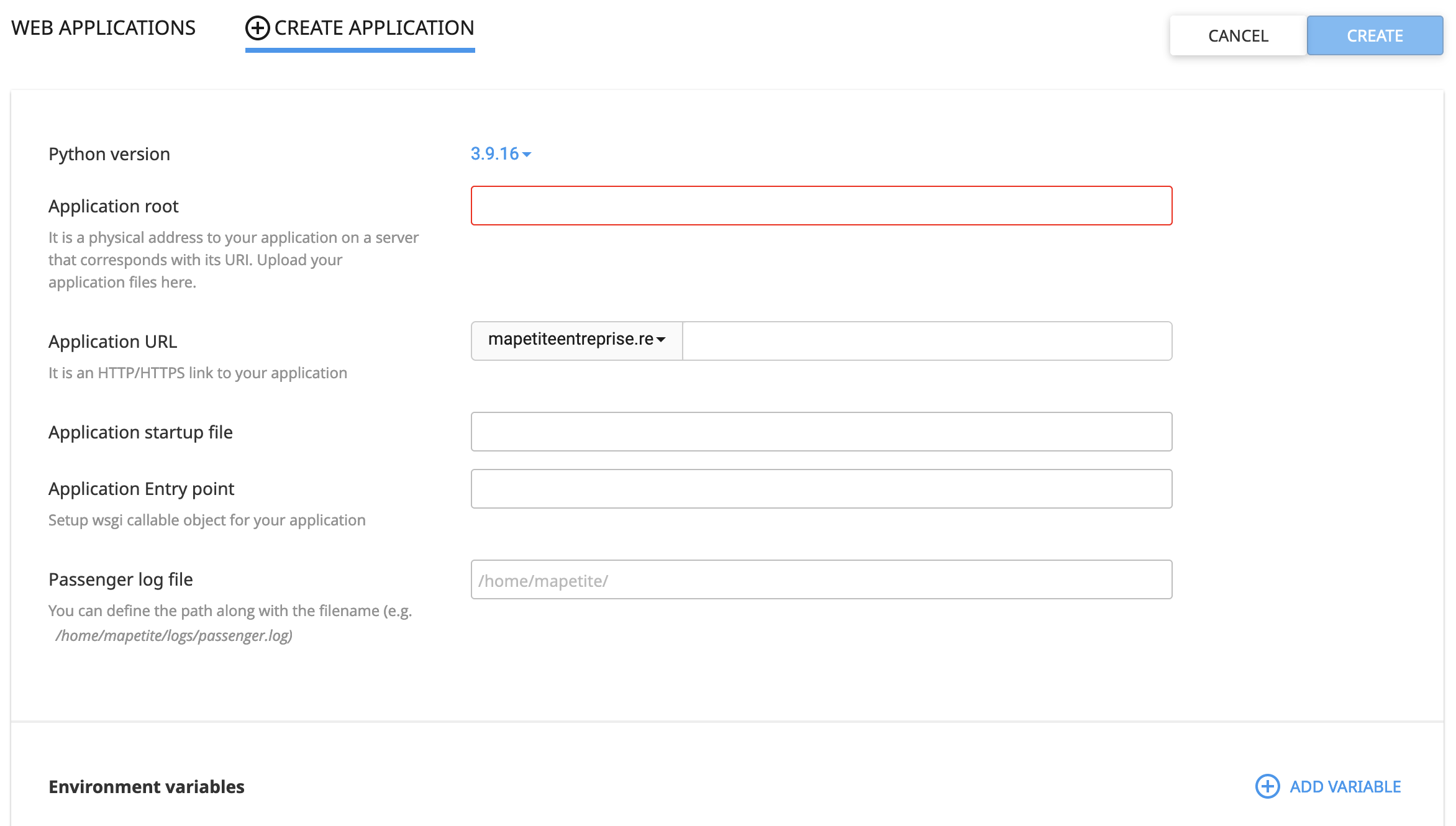
Create: click here after filling in the form to create your application
Python version: choose the version of Python to use (feel free to contact our support if the one you need is missing)Application root: enter the folder where your application's code is located (preferably use a folder different from the domain's folder where you will deploy your application)Application URL: enter the URL where you want to deploy your application, optionally with a subdirectory (cPanel will create a .htaccess file at that location)Application startup file: enter the WSGI file used to start your application, it must be present in theApplication rootfolderApplication Entry Point: enter the function, contained in your WSGI file, that must be called to run the application (generallyapplication).Passenger log file: enter the location where you want to create the log file (optional but useful for debugging)Environment variables - Add Variable: add the environment variables required by your application
Show more errors
The error page displayed in the web browser is, by default, fairly simple. You can enable a more advanced debugging mode in Phusion Passenger to display more errors by adding the following lines to the .htaccess file at the root of the domain (and, where applicable, the subdomain):
PassengerAppEnv development
PassengerFriendlyErrorPages on
My application won't start
If the Python application doesn't start, it means Phusion Passenger is unable to launch the application via your WSGI file, so either the path to the WSGI file is incorrect, or the function specified in Application Entry Point is incorrect.
Updated on: 15/08/2026
Thank you!