
How to access cPanel?
There are several ways to access cPanel, depending on your situation.
If you are not sure which case applies to you, the first access method is the most common: "Shared hosting and managed web hosting > Via your client area". This is the one you can use by default.
A specific access method is also available for participants in 24h by WebCup (see the last section of this page).
Shared hosting and managed web hosting
This is the general case for most clients. You have two options to access cPanel:
- Via your client area (simplest method):
- Log in to your client area
- In the "My Account" menu, choose "My Services"
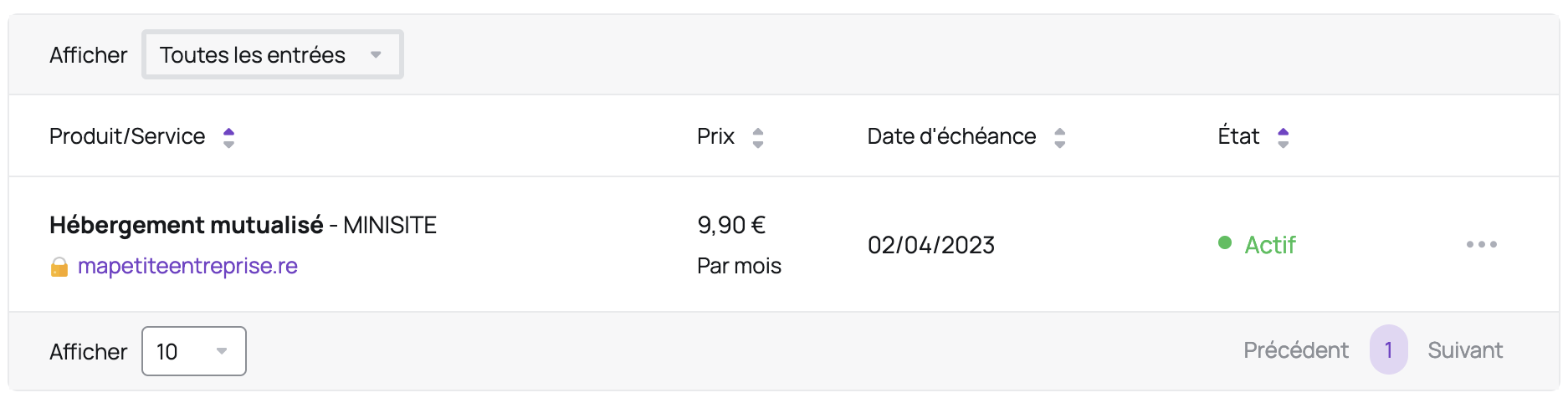
- Click on "Web Hosting" in the row corresponding to the cPanel you wish to access
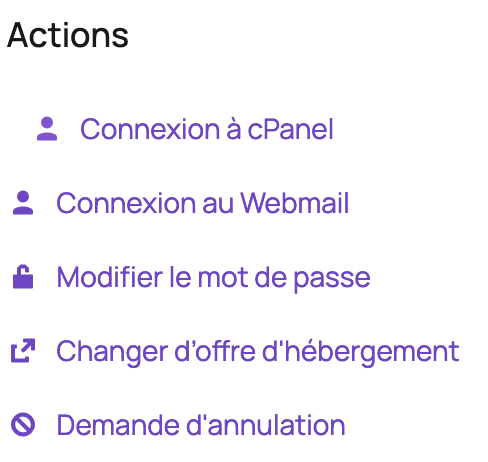
- On the left, under "Actions", click on "Log in to cPanel":
- If cPanel does not open, check that your browser is not blocking popup windows.
- Via direct access (advanced method):
- Add
/cpanelto the end of your website's domain name, for examplehttp://mysmallbusiness.re/cpanel
- Enter the credentials contained in your welcome email (these are not your client area login/password)
- If you have lost your cPanel username or password, click here to find out how to retrieve your username or reset your password
Dedicated server
For clients who have a dedicated server with Hodi, here is the procedure:
- Add
:2083to the end of your domain name, for examplehttps://mysmallbusiness.re:2083 - Enter the credentials provided to you by Hodi for managed servers (these are not your Hodi client area login/password) or by your technical contact for unmanaged servers
- If you have lost your password, contact Hodi customer support for managed servers (please note: you must be authorized to make this request), or your technical contact for unmanaged servers
For security reasons, cPanel access is restricted to your IP addresses by default. If the page does not load, check that you are on an authorized IP address (for example, that you have started your VPN if you are working remotely).
24h by WebCup
For participants in 24h by WebCup where Hodi is a partner, here is the procedure:
- Add
/cpanelto the end of the domain name assigned to you, for examplehttps://myteam.reunion.webcup.hodi.host/cpanel - Enter the credentials displayed on the Server section of your dashboard (these are not your WebCup account login/password)
- If you have lost your password, you can change it on the Server section of your dashboard
Updated on: 21/02/2026
Thank you!