
How to change PHP options on your hosting?
You can easily customize the PHP settings of your hosting for the specific needs of each domain or subdomain. These settings are stored in a file called php.ini.
Using the tool included with your hosting, you can adjust variables such as:
display_errors: to enable or disable the display of PHP errors (useful for debugging),memory_limit: to set the maximum memory a script can use,upload_max_filesize: to adjust the maximum upload file size,max_execution_time: to set the maximum execution time of a script,- and many more.
With these options, you can optimize the performance, security and compatibility of your websites with ease.
Here are the instructions to modify your PHP settings:
- Log in to your cPanel
- In the "Software" section, choose "MultiPHP INI Editor"
- Choose the website for which you wish to modify the PHP options:

- Choose the options you wish to modify:
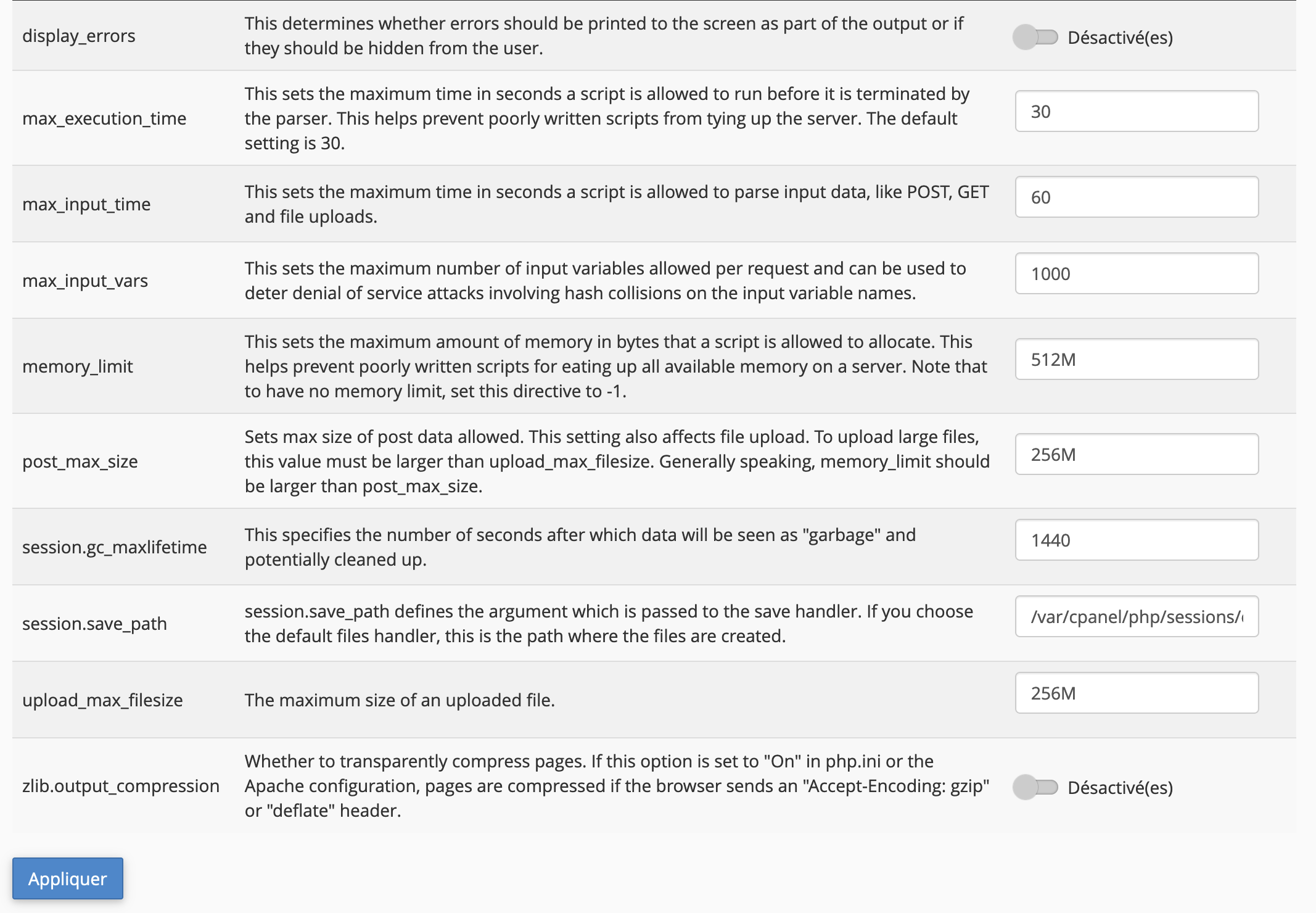
- Click on "Apply"
If you are an expert, you can write a custom php.ini by clicking on the "Editor Mode" tab.
Warning: for security reasons, options related to command execution (exec, passthru, shell_exec, system) can only be modified upon request to our technical support.
Updated on: 21/02/2026
Thank you!