
How do I change my hosting's PHP version?
At Hodi, you have the freedom to choose the PHP version best suited to your projects, directly from your hosting account. Each domain or subdomain can use a different PHP version, depending on your needs. The method differs depending on whether you are using the crontab or the command line, or your website.
Even officially obsolete versions remain available at Hodi thanks to a specific support contract, guaranteeing a high level of security: security patches for these older versions are applied manually to ensure the stability and security of your sites.
Changing it for the crontab
Simply replace php with ea-phpXX, where XX corresponds to the version without the dot:
Example:ea-php82 for PHP 8.2.
Changing it for the command line
Add the correct version to your environment with the following command, where XX corresponds to the version without the dot:
PATH="/opt/cpanel/ea-phpXX/root/usr/bin:$PATH"Example (for PHP 8.2):
PATH="/opt/cpanel/ea-php82/root/usr/bin:$PATH"This allows you, for example, to use the correct PHP version with composer.
If you use a CI/CD script (such as GitHub Actions), place this line at the top of your script to force the desired version.
Changing it for your website
- Log in to your cPanel
- In the "Software" section, choose "MultiPHP Manager"
- Check the sites for which you want to change the PHP version on the left
- Choose the desired PHP version from the drop-down menu:
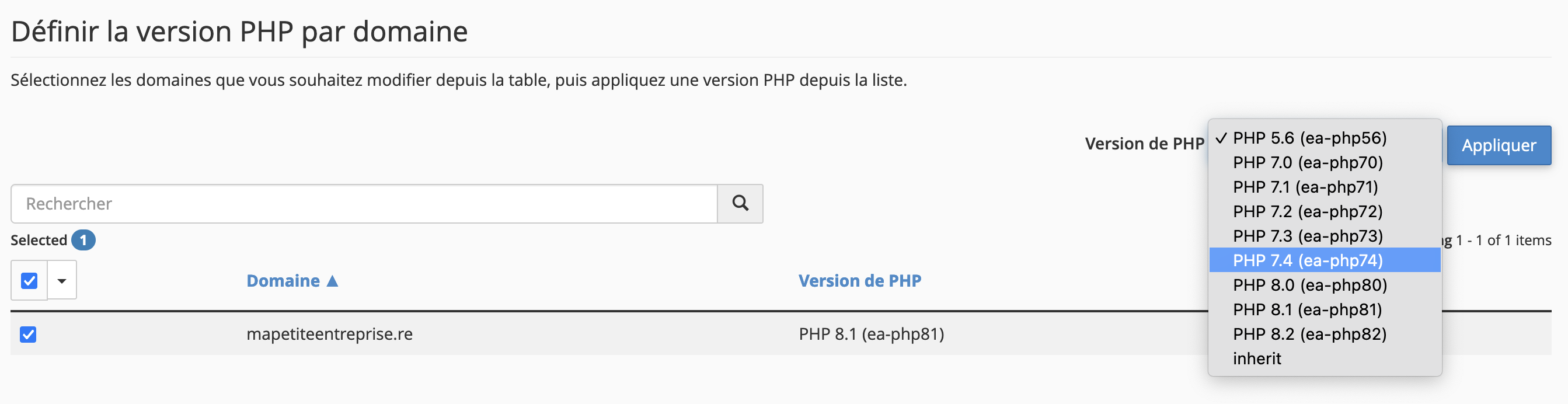
- Click "Apply"
- The change will take effect within a few minutes, and your site may be briefly inaccessible during the switch.
- If you need to use a command-line script, you must still follow the instructions above, as the change made via "MultiPHP Manager" only applies to web access.
Warning: before changing the PHP version, check that your site is indeed compatible with the new version.
Updated on: 17/07/2026
Thank you!