
How to deploy a Ruby application?
We allow you to deploy a Ruby application (also known as Ruby on Rails or RoR for short) directly on your hosting, without having to manage anything yourself. Technically, the deployment is based on Phusion Passenger.
- Log in to your cPanel
- In the "Software" section, choose "Setup Ruby App"
- Click on "Create Application"
- Fill in your application information:
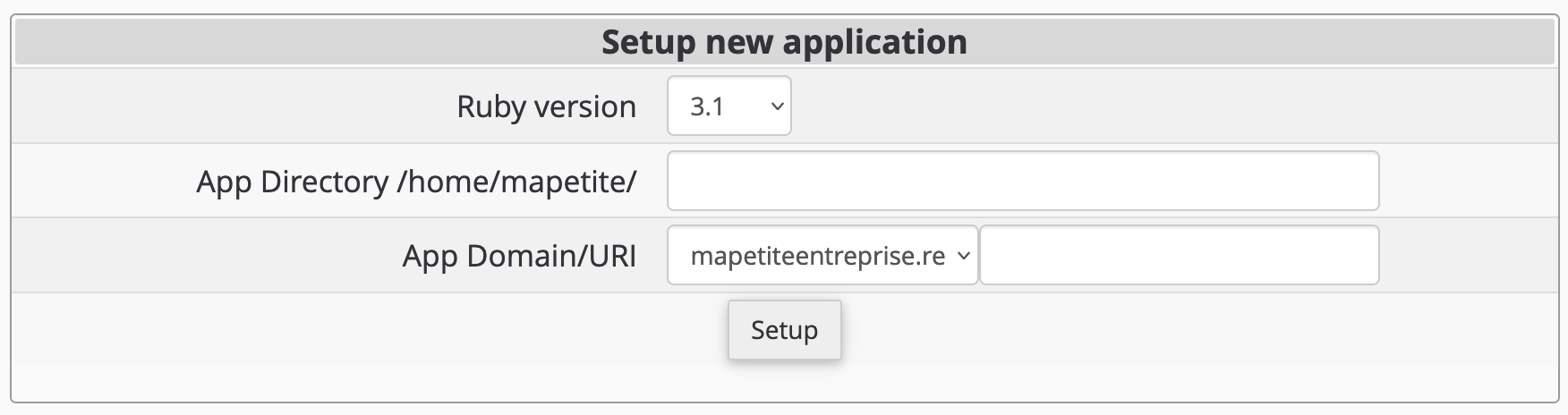
Ruby version: choose the Ruby version to use (feel free to contact our support if you need one that is not listed)
App Directory: specify the folder where your application code is located (preferably use a folder different from the one for the domain where you will deploy your application)App Domain/URI: specify the URL where you want to deploy your application, optionally with a subdirectory (cPanel will create an .htaccess file at this location)Setup: click here to create your application
Display more errors
The error page displayed in the web browser is, by default, quite basic. You can enable a more detailed debugging mode in Phusion Passenger to display more errors by adding the following lines to the .htaccess file at the root of the domain (and subdomain if applicable):
PassengerAppEnv development
PassengerFriendlyErrorPages on
Updated on: 21/02/2026
Thank you!