
How to improve the deliverability of your emails?
DKIM, SPF and DMARC: what are they?
If your emails end up in spam for your recipients, it is possible that your deliverability is not optimal, particularly due to a DKIM and/or SPF configuration issue. Indeed, two main mechanisms come into play to ensure that emails do not end up in spam: DKIM and SPF.
These two mechanisms authenticate the server that sends your emails and limit domain spoofing. Simply put, with DKIM and SPF our mail server adds DNS-based authentication to each email you send, authentication that a spammer wanting to spoof your domain name cannot use, and which allows the recipient's server to differentiate a legitimate email from a fraudulent one.
In addition to DKIM and SPF, DMARC strengthens email security by allowing you to define the handling policy for messages where DKIM or SPF authentication fails, for your domain name. DMARC is also DNS-based.
In the absence of DMARC, it is the recipient's server that decides to reject the email, or mark it as spam, if DKIM and/or SPF authentication fails.
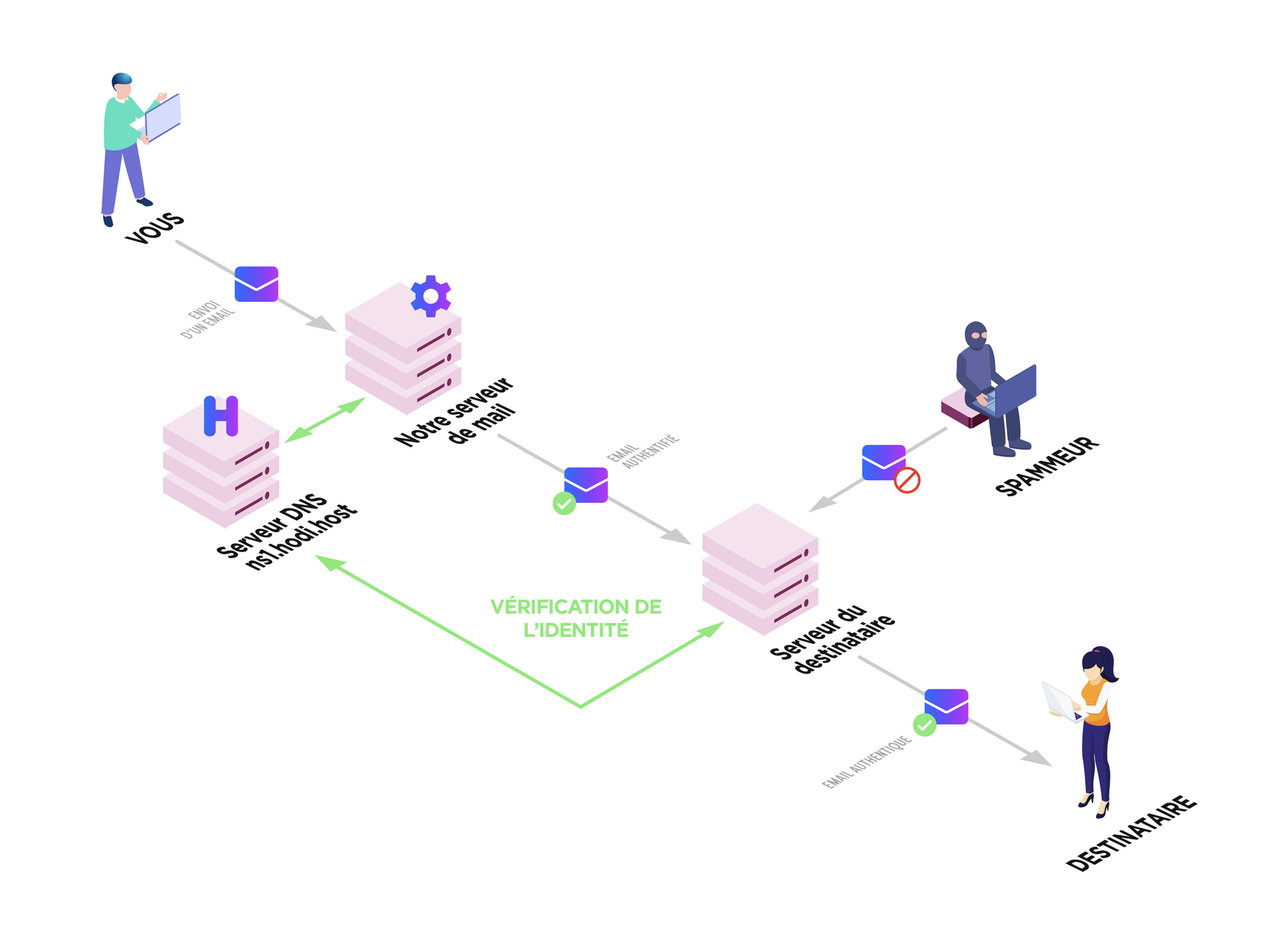
SPF and DKIM configuration
If you use our mail server
When your hosting is created, we set up a correct configuration, but it is possible that this has changed following modifications you may have made to your DNS zone.
Here is how to verify the correct SPF and DKIM configuration:
- Log in to your cPanel
- In the "Emails" section, choose "Email Deliverability"
- cPanel then checks that the SPF and DKIM information is correct and displays a message if not:

- If problems are found, you can fix the configuration using the "Repair" button:
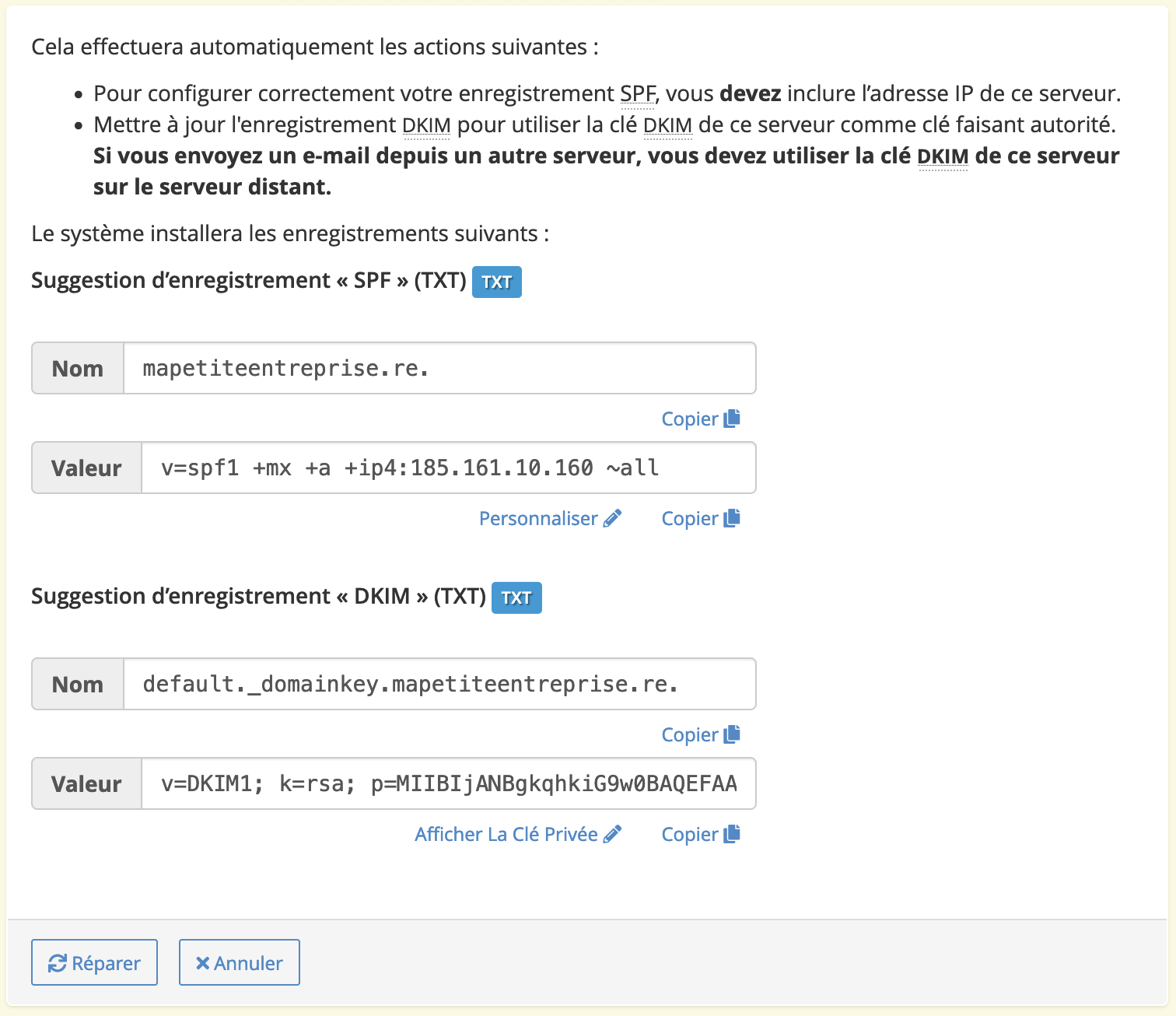
- If your domain name does not use our DNS servers, you will need to make the changes on the DNS management interface of your DNS servers.
If you use a third-party mail server
We invite you to check with the relevant provider for the correct DKIM and SPF configuration, then verify in your DNS zone that the required DNS records are properly configured. It is very likely that your provider offers a DKIM and SPF verification tool. Do not hesitate to contact their support for more information.
Warning!
You must have only one SPF record (DNS record of type TXT starting with "v=spf1").
If the third-party provider asks you to add an SPF record, you actually need to modify your current SPF record to include the provider's, for example, if they ask you to add "v=spf1 include:spf.monfournisseur.fr ~all" and your current record on cPanel is "v=spf1 +a +mx +ip4:185.161.10.160 ~all", you should modify it to "v=spf1 +a +mx +ip4:185.161.10.160 include:spf.monfournisseur.fr ~all".
If there are multiple SPF entries on your domain name, this will cause deliverability issues.
Here are some resources that may help you verify the correct configuration:
- SPF configuration for Google Workspace
- DKIM configuration for Google Workspace
- SPF configuration for Microsoft 365
- DKIM configuration for Microsoft 365
DMARC configuration
We recommend waiting 48 hours after configuring SPF and DKIM before setting up DMARC.
Here is how to set up your DMARC configuration:
- Access your DNS zone
- Search for
_dmarc - If you find a record, you will need to modify it using one of the examples below
- If you find nothing, you will need to add a
TXTrecord using one of the examples below, with the name_dmarc.followed by your domain name (for example,_dmarc.mapetiteentreprise.re)
DMARC record value | Explanation |
|---|---|
v=DMARC1; p=none; | Do nothing if an email is non-compliant with your DKIM and SPF rules |
v=DMARC1; p=quarantine; | If an email is non-compliant with your DKIM and SPF rules, quarantine it (e.g., in the "spam" folder) |
v=DMARC1; p=reject; | If an email is non-compliant with your DKIM and SPF rules, reject it |
You can also use a free third-party service provided by Postmark to get weekly reports on the deliverability of your emails. This service will give you a specific DMARC record to set up.
Check your DMARC record on MxToolbox
Updated on: 21/02/2026
Thank you!