
How to change the PHP version of your hosting?
At Hodi, you have the freedom to choose the PHP version best suited to your projects, directly from your hosting. Each domain or subdomain can use a different PHP version, depending on your needs. The method differs depending on whether you are using crontab or the command line, or your website.
Even officially deprecated versions remain available at Hodi thanks to a specific support contract, guaranteeing a high level of security: security patches on these older versions are applied manually to ensure the stability and security of your websites.
Modification for crontab
Simply replace php with ea-phpXX, where XX corresponds to the version without a dot:
Example:ea-php82 for PHP 8.2.
Modification for command line
Add the correct version to your environment with the following command, where XX corresponds to the version without a dot:
PATH="/opt/cpanel/ea-phpXX/root/usr/bin:$PATH"Example (for PHP 8.2):
PATH="/opt/cpanel/ea-php82/root/usr/bin:$PATH"This allows, for example, using the correct PHP version with composer.
If you are using a CI/CD script (such as GitHub Actions), place this line at the top of your script to force the desired version.
Modification for your website
- Log in to your cPanel
- In the "Software" section, choose "MultiPHP Manager"
- Check the websites on which you wish to change the PHP version on the left
- Choose the desired PHP version from the dropdown menu:
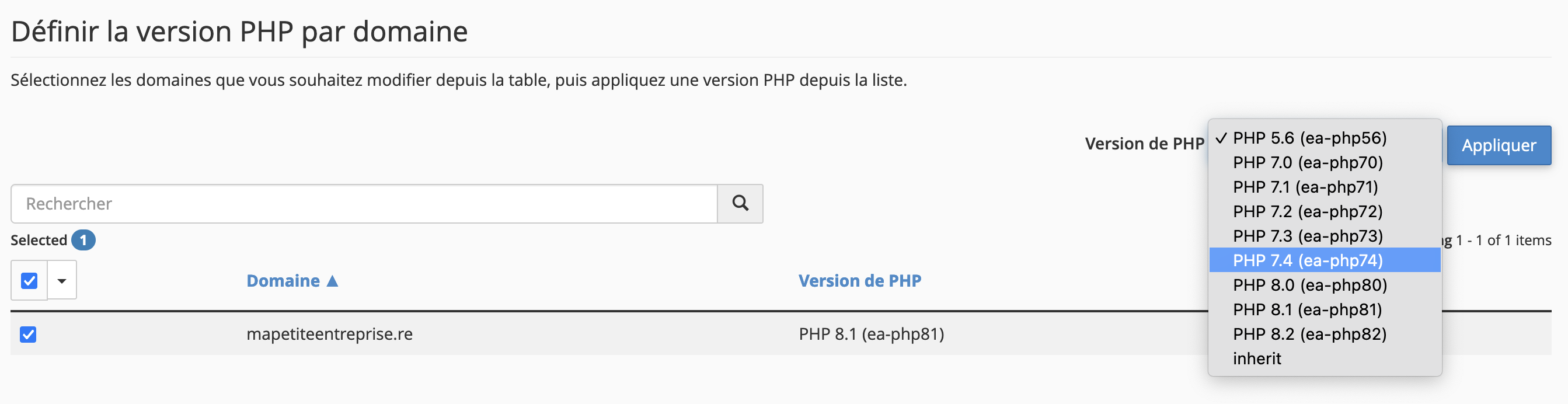
- Click on "Apply"
- The change will take effect within a few minutes, and your website may be briefly inaccessible during the switch.
- If you need to use a command line script, you must still follow the instructions above, as the change made via "MultiPHP Manager" only applies to web access.
Warning: before changing the PHP version, make sure your website is compatible with the new version.
Updated on: 21/02/2026
Thank you!