
How do I access cPanel?
There are several ways to access cPanel, depending on your situation.
If you're not sure exactly which case applies to you, the first access method is the most common: "Shared hosting and managed web hosting > Via your Client Area". This is the one you can default to.
A specific access method is also provided for 24h by WebCup participants (see the last point on this page).
Shared hosting and managed web hosting
This is the general case for most clients. You have two options for accessing cPanel:
- Via your Client Area (the simplest method):
- Log in to your Client Area
- In the "My account" menu, choose "My services"
- Click "Web Hosting" on the line corresponding to the cPanel you want to access
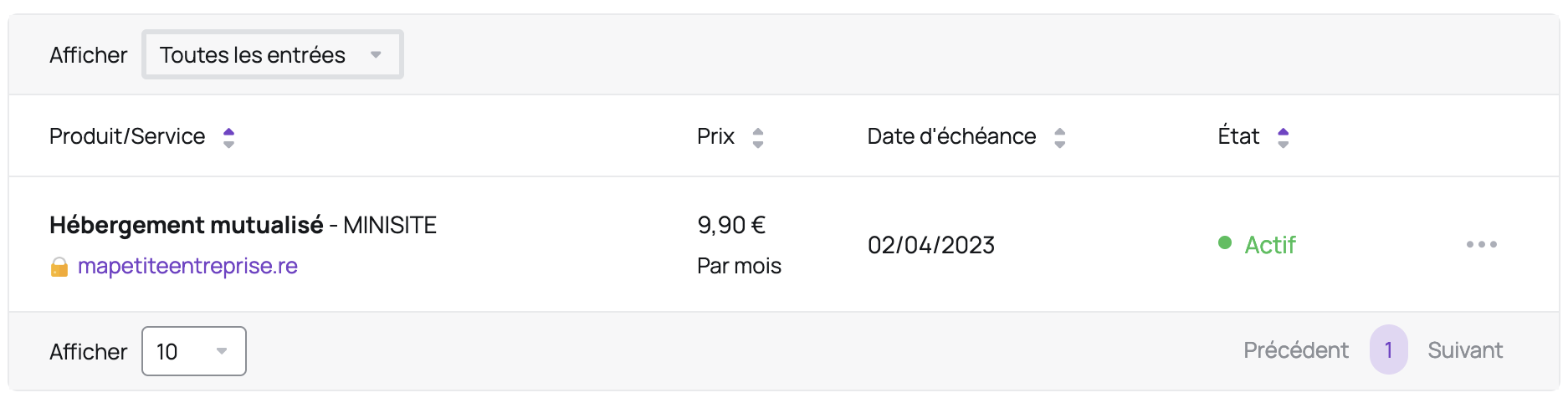
- On the left, under "Actions", click "cPanel Login":
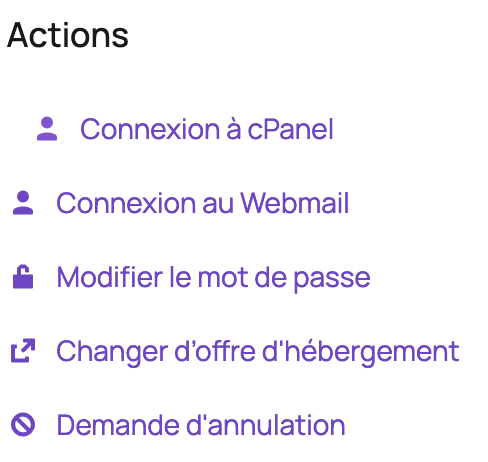
- If cPanel doesn't open, check that your browser isn't blocking pop-up windows.
- Via direct access (advanced method):
- Add
/cpanelto the end of your site's domain name, for examplehttp://mapetiteentreprise.re/cpanel
- Enter the credentials from your welcome email (this is not your Client Area login/password)
- If you've lost your cPanel username or password, click here to find out how to retrieve your username or reset your password
Dedicated server
For clients who have a dedicated server with Hodi, here's the procedure:
- Add
:2083to the end of your domain name, for examplehttps://mapetiteentreprise.re:2083 - Enter the credentials provided to you by Hodi if you have a managed server (this is not your Hodi Client Area login/password), or by your technical contact if you have an unmanaged server
- If you've lost your password, contact Hodi customer support if you have a managed server (note: you must be authorized to make this request), or your technical contact if you have an unmanaged server
For security reasons, cPanel access is restricted by default to your IP addresses. If the page doesn't load, check that you're on an authorized IP address (for example, that you've properly connected to your VPN if you're working remotely).
24h by WebCup
For 24h by WebCup participants, of whom Hodi is a partner, here's the procedure:
- Add
/cpanelto the end of the domain name assigned to you, for examplehttps://monequipe.reunion.webcup.hodi.host/cpanel - Enter the credentials shown in the "Server" section of your dashboard (this is not your WebCup account login/password)
- If you've lost your password, you can change it in the "Server" section of your dashboard
Updated on: 17/07/2026
Thank you!