
How Do I Deploy a Ruby Application?
We let you deploy a Ruby application (also known as Ruby on Rails, or RoR for short) directly on your hosting, without having to worry about monitoring anything yourself. Technically, the deployment is based on Phusion Passenger.
- Log in to your cPanel
- In the "Software" section, choose "Setup Ruby App"
- Click "Create Application"
- Enter the details of your application:
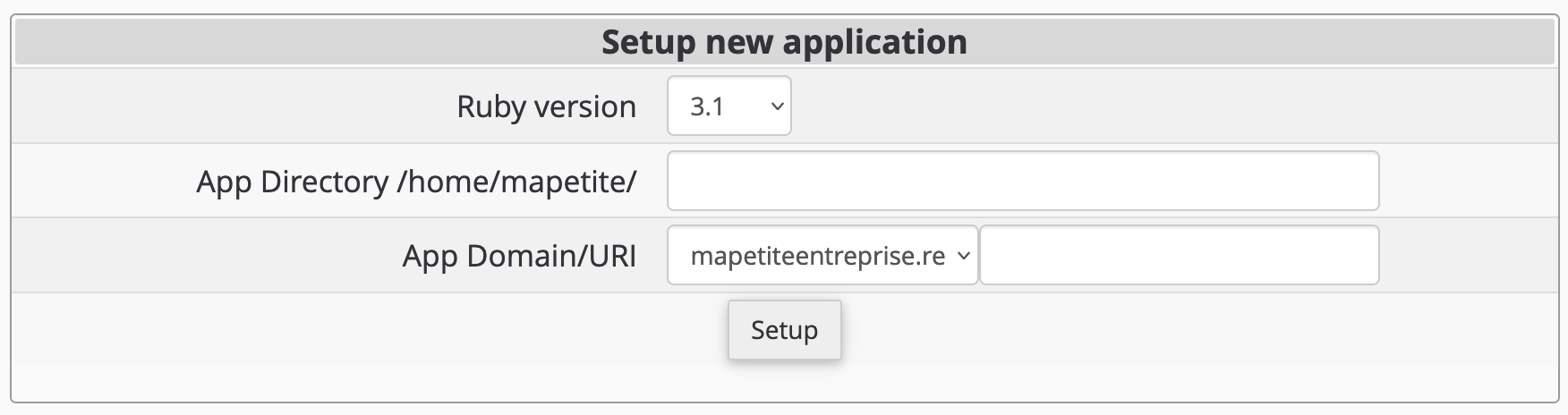
Ruby version: choose the Ruby version to use (feel free to contact our support team if the one you need is missing)App Directory: specify the folder where your application's code is located (preferably use a folder different from the domain's folder where you'll be deploying your application)App Domain/URI: specify the URL where you want to deploy your application, optionally with a subdirectory (cPanel will create an .htaccess file there)Setup: click here to create your application
Show more errors
The error page displayed in the web browser is, by default, fairly basic. You can enable a more advanced debug mode in Phusion Passenger to display more errors by adding the following lines to the .htaccess file at the root of the domain (and the subdomain, if applicable):
PassengerAppEnv development
PassengerFriendlyErrorPages on
Updated on: 17/07/2026
Thank you!