
How to redirect your domain name to your Facebook page or another site?
You can redirect your domain name (e.g.: mybusiness.re) to another website of your choice, such as your Facebook page. Unlike most hosting providers, redirections work over both HTTP and HTTPS.
- Go to "My Account" then "My Domains"
- Click on the domain where you want to create a redirect
- In the "Manage" section on the left, click on "DNS Zone Editor".
- In the "Add a new DNS record" section, click on the "A" dropdown menu and choose "REDIRECT", then enter your address in the "Address/Value" field and select the redirect type from the redirect menu if applicable:
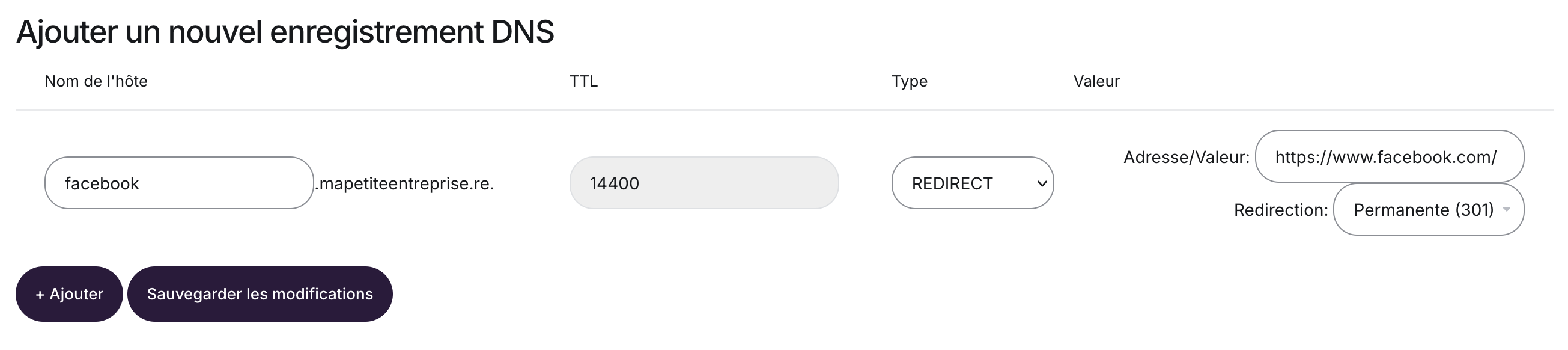
- Save your changes by clicking "Save Changes"
What is the difference between the different redirect types?
301 - Permanent Redirect
Tells browsers and search engines that your site has permanently moved to a new address.
SEO ranking is transferred to the new address.
Use this if the change is permanent.
302 - Temporary Redirect
Indicates that the redirect is temporary.
Search engines generally continue to index the original address.
Use this for testing, maintenance, or a one-time redirect.
Invisible Redirect
The domain name remains displayed in the address bar, even though the content comes from another site.
Technically, this method uses an iframe.
Note: some websites (such as Facebook, certain payment tools, or secure services) refuse to be displayed in an iframe. In that case, the invisible redirect may not work properly. If you want to redirect to a social network or an external service, it is recommended to use a 301 or 302 redirect.
When in doubt, use a 301 redirect if your change is permanent.
Updated on: 05/03/2026
Thank you!