
How do I redirect my domain name to my Facebook page or another website?
You can redirect your domain name (e.g. mapetiteentreprise.re) to another website of your choice, such as your Facebook page. Unlike most hosting providers, the redirect works in both HTTP and HTTPS.
- Go to "My account" then "My domains"
- Click on the domain where you want to create a redirect
- In the "Manage" section on the left, click "DNS Zone Editor".
- In the "Add a new DNS record" section, click the "A" dropdown menu and choose "REDIRECT", enter your address in the "Address/Value" field, and specify the redirect type in the redirect menu if applicable:
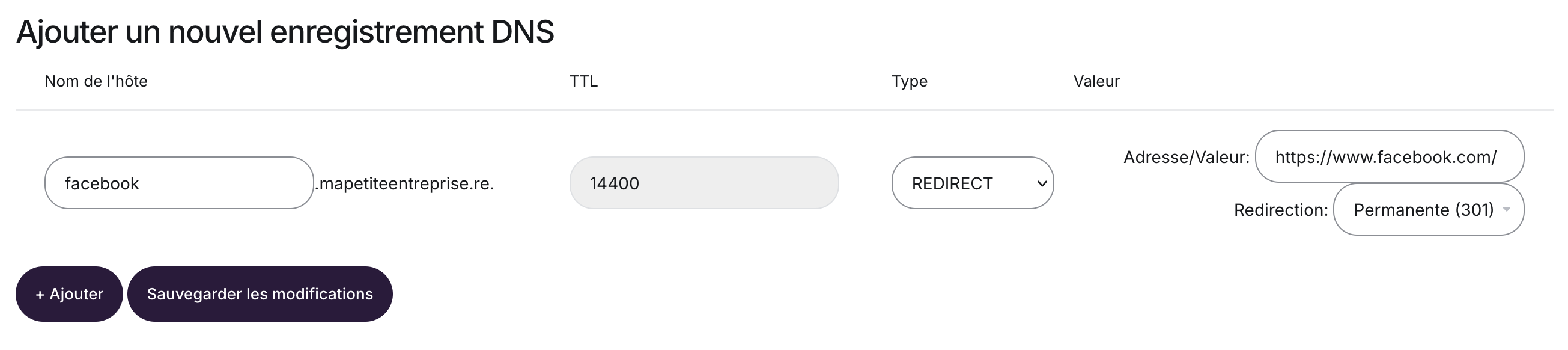
- Save your changes by clicking "Save Changes"
What's the difference between the different types of redirect?
301 - Permanent redirect
Tells browsers and search engines that your site's address has changed permanently.
SEO is transferred to the new address.
Use this if the change is permanent.
302 - Temporary redirect
Indicates that the redirect is temporary.
Search engines generally continue to index the original address.
Use this for a test, maintenance, or a one-off redirect.
Invisible redirect
The domain name stays displayed in the address bar, even though the content comes from another site.
Technically, this method uses an iframe.
Warning: some sites (such as Facebook, certain payment tools, or secure services) refuse to be displayed in an iframe. In that case, the invisible redirect may not work correctly. If you want to redirect to a social network or an external service, it's recommended to use a 301 or 302 redirect.
If in doubt, use a 301 redirect if your change is permanent.
Updated on: 17/07/2026
Thank you!